AMT ForeSight PRIVATE BETA

Auction Market Theory levels, framed live inside Bookmap.

AMT ForeSight reads the day's structure for you — prior-day & overnight levels, the live Initial Balance Continuation / Failure framework, multi-day naked VPOCs, and where price is most likely to react — and streams it onto your chart. It tells you the odds, not the future.

probabilities, not predictions

PRIOR DAYVPOC · VAH/VAL
High/Low/Close
OVERNIGHTONH · ONL
ON VPOC · Mid
INITIAL BALANCEIB / IB30 · IBC
IBF · extensions
HTF NAKED VPOCMulti-day · composite
auto-detected

Two builds, pick by your data feed — every tier free to download: your own data feed (most users) · Bookmap data (BookmapData).

Bookmap v7.6.0+ Free · Pro · Pro+ Streams to Cloud Notes
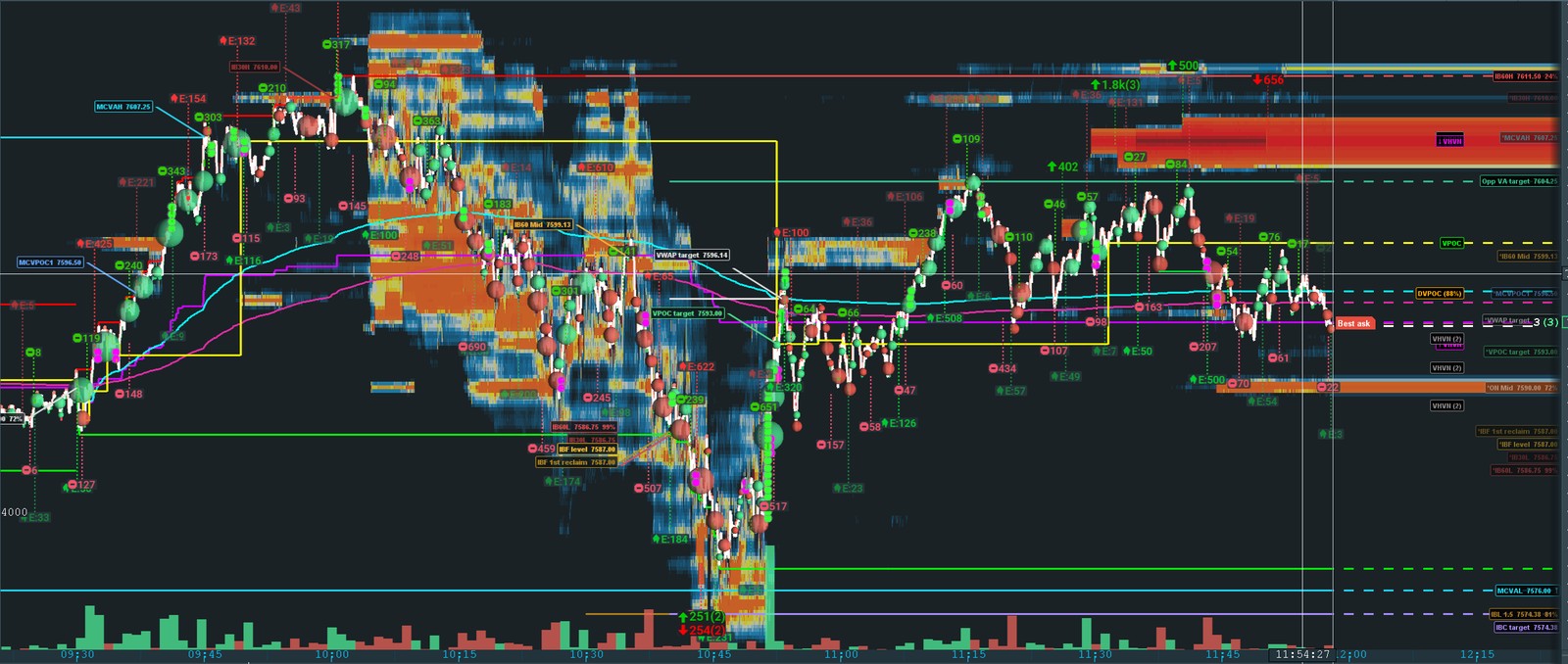
● ACTUAL SCREENSHOT AMT ForeSight running live in Bookmap: prior-day and overnight level lines with ANGLE+ hit markers, VPOC / DVPOC / VHVN badges, MCVAH / MCVPOC / MCVAL composite levels, Initial Balance levels with IBF and IBC targets, and VWAP — all drawn on a live futures chart. ⤢ Click to enlarge

AMT ForeSight running live in Bookmap — a real capture, not a mockup

The whole auction, one chart.

AMT ForeSight tracks the four families of levels that drive Auction Market Theory trading — and the live state machine that tells you which way the session is leaning.

Reference

Prior-Day Levels

Prior VPOC, value-area high/low, and the day's high, low, close and mid — the settled reference every AMT trader opens against. Each carries a live hit rate and distance-to-price readout.

Pre-market

Overnight Levels

Overnight high, low, VPOC and mid, formed during Globex and re-captured right up to the bell. The context that frames the open before RTH even starts.

Live state machine

Initial Balance — IBC / IBF / IB30

The 60- and 30-minute Initial Balance, tracked live: continuation vs failure, reclaim detection, extension ladders and cascade targets — with reference rates for what usually happens next given today's open type.

Multi-day

HTF Naked VPOCs & Composite

Naked VPOCs the market hasn't returned to — auto-detected each session and persisted across days until exactly tagged — plus composite VPOC/VAH/VAL, single prints and area gaps, each showing drift vs the prior value.

The watching, done for you.

Think about everything you are tracking on a chart at once. Where every prior day level, the overnight high and low, VWAP, VPOC, and the initial balance sit relative to price right now. Which of them already got hit today, when, and in what order. Where a few of them stack into one zone. Which level price is walking into next. And you are doing all of that in your head, while you read the tape and manage your risk.

ForeSight does that part for you. Behind the panel, more than 600 functions run every second, doing the watching and the math so you are not holding it all in your head. It marks your session structure automatically, tracks your own levels across days, and tells you in real time when and how price reacts to each one. The chart stays clean. The bookkeeping stays on the side.

It does not make the call for you. It does the watching, so your attention is free for the read and the risk, the parts that are yours.

ForeSight, for Bookmap. The free version is yours to keep, with paid tiers when you want more.

Under the hood
36,000+
lines of code, 600+ functions
12 timers
and dozens of threads, refreshing every 700 ms
200+ / 160+
synchronized sections and volatile fields keeping it thread safe
4 painters
drawing to the chart canvas

What it looks like on the chart.

These are stylized illustrations of the concepts — see the actual screenshot above for what it really looks like. The four diagrams below are drawn representations of reads ForeSight runs every session; on your chart they render in Bookmap's own canvas, not like this.

Every level — and the moment price tags it

A level isn't just drawn. It records the tag.

Prior-day VPOC, a multi-day MC level, your own custom line — each sits on the chart with a live hit rate. The instant price first touches one, it flips to a hit style and stamps the time it happened.

The default style is ANGLE+: the line truncates at the tag with a slanted tail and a persistent right-of-timeline label carrying the @time. Eight hit styles in all — dash, dim, stop, stop+, angle, angle+, hide, none — so a tag reads at a glance. Levels the session gapped over untested carry a ⤒ / ⤓ marker instead.

P VPOC MC level custom tagged @time
Watch the point of control migrate

The auction's center of gravity, moving.

ForeSight follows the developing VPOC as it walks across the session. Every place it leaves behind becomes a VHVN — a high-volume node the market may revisit. Until price re-prints that exact tick, the node stays naked (magenta); once tested it fades to gray.

The current VPOC reads in green. When a runner-up node holds at least 2 points away with real volume behind it, it surfaces as the DVPOC with a development percentage — how close the challenger is to taking over.

current VPOC DVPOC % naked VHVN tested VHVN
Review a replay without touching your live data

Step through the day. Nothing gets written.

Scrub Bookmap replay and ForeSight reveals levels, hits, and the VPOC in step with the cursor — a hit only appears once the replay cursor reaches the moment it actually happened. Drag back and it un-reveals. The picture rebuilds itself as you move.

And it's a true sandbox: every level, settings, snapshot and history writer no-ops in replay. Your saved record is built by live sessions only — replay can study it, never alter it.

replay cursor revealed not yet reached
Read the whole auction in one window

Every read, stacked in one panel.

The free stats window opens the day at a glance: the open type and a directional bias call up top, then each level as a row carrying its published Stat % beside your own empirical My %, a proximity meter, and VWAP fair value for both sessions.

The eight-dot meter shows how close price is sitting to each level right now — so the row you should care about is the one lit up.

bias proximity meter VWAP

Read the day faster — and put it on the chart.

The full stats read — levels, the IB framework, VWAP and gap context — is free. Pay only for the layers built on top: your levels drawn on the chart, Session Alarms and custom & HTF levels (Pro), and live VPOC tracking and Cloud Notes (Pro+).

FreeRead the day — no key required
📊

AMT Stats WindowFREE

Every framework level with its live hit rate, distance to price, and a running hit sequence. Day-type and open-type classification (OD / OTD / OAOR / OAIR…) with a directional bias call — so you read context, not just lines.

⚖️

IBC / IBF / IB30 FrameworkFREE

The Initial Balance Continuation / Failure state machine, live: first break, two-reclaim failure, reclaim events, extension ladders and revert targets — each with reference probabilities for the current open type. The AMT framework, free.

📐

VWAP StatsFREE

RTH and full-session VWAP, each with distance from price, 30-minute slope, session range, anchor time, price-vs-anchor and a touch count with last-touch time. The volume-weighted fair value, both sessions.

Gapped-Over MarkersFREE

When the session opens past a level and leaves it untouched, the addon flags it with a compact ⤒ / ⤓ marker — in the stats window and on the chart label. A level you gapped is naked, not consumed, until price actually trades back and tests it during RTH.

💾

Session RebuildFREE

Attach mid-session or restart after a crash and the addon rebuilds the day from Bookmap's own stored history — RTH high/low, the volume profile, Initial Balance, VPOC migration and every level hit. Your chart comes back exactly where it was.

⚙️

Settings From Any ChartFREE

A ⚙ button right on the stats window opens the full tabbed settings from whichever chart you're on — no digging through Configure-add-ons. Built for multi-chart desks.

Replay-SafeFREE

Scrub Bookmap replay freely — your saved levels, hit history, and feeds are never altered by a replay. Live builds the record; replay only ever observes it.

🕕

Session-AwareFREE

Proper Globex session handling with an 18:00 ET rollover, RTH/ETH hit gating, configurable session window and timezone that auto-adjusts session open/close, and pre-RTH level re-capture before the bell.

🔓

One Jar, Three TiersFREE

A single download. The stats read works free forever; one activation key unlocks your tier — chart drawing at Pro, VPOC tracking and the full toolkit at Pro+. No separate installs.

ProPut every level on your chart
📈

On-Chart Level LinesPRO

Every level rendered as a horizontal line on the Bookmap chart, with 8 hit styles — dash, dim, stop, stop+, angle, angle+, hide, none — so a level visibly changes the moment price tags it. The visual layer most traders pay for first.

🎨

Per-Level StylingPRO

Color, line style, display mode (line / label / both), and hit behavior — overridable per individual level, with reusable style templates. Make your chart read the way you think.

🔔

Session AlarmsPRONEW

Voice, chime or tone alarms for the moments that matter: one-click chips for RTH / ETH / London / Asia opens & closes, plus zone presets (Lunch Chop, Final Hour, Pre-Market), or set any custom time. Optional pre-alerts and a spoken countdown that lands on time. US Eastern, replay-safe (fires live only).

✏️

Custom LevelsPRO

Add your own named price levels with full per-level customization and an optional CSV auto-feed that hot-reloads on change. Your levels flow through the same hit-detection and chart machinery as the built-ins.

🗓

Multi-Day HTF LevelsPRO

Naked VPOCs, composite VPOC/VAH/VAL, single prints and area gaps that persist across sessions until tagged, then expire — with drift tracking vs the prior saved value and a dedicated expired-history bucket.

Pro+Live VPOC tracking + the full toolkit
🔀

VPOC Migration TrackingPRO+

Follow the developing point of control as it migrates through the session — directional shift count, current vs developing VPOC, and naked / tested VHVN detection. On the stats panel and, with chart drawing on, as live on-chart badges.

🏷️

On-Chart VPOC BadgesPRO+

Developing-VPOC percentage, current/naked/tested VHVN labels and VHVN clustering drawn directly on the chart, z-ordered so the developing % always reads on top — flush-right with an adjustable pixel offset.

🔔

Migration AlertsPRO+

Voice and sound alerts when the VPOC shifts ("VPOC moved up / down") or a VHVN is touched — with per-type cooldowns, selectable voice and rate, and a choice of alert sounds.

🌐

Cloud Notes FeedsPRO+

Publish any subset of your tracked levels to Bookmap Cloud Notes over local HTTP — multiple categorized feeds, each on its own port, with per-level colors that inherit your chart styling. 127.0.0.1:PORT/Stats.csv

Free to read the day. Pay for the tooling.

One jar, three tiers, gated at runtime by your key. The entire stats read — levels, the IB framework, VWAP and gap context — is free forever. The paid tiers add the layers built on top.

Free
$0ALWAYS FREE
Read the whole auction in a window.
  • AMT stats window — prior-day & overnight levels, hit rates, distances
  • Day-type / open-type classification + directional bias
  • IBC / IBF / IB30 Initial Balance framework
  • VWAP stats — RTH & full-session
  • Gapped-over ⤒ / ⤓ markers
  • Session rebuild — chart restores after a crash or mid-session attach
  • ⚙ Settings from any chart · replay-safe · session-aware
↓ Download free
Pro
PRICING SOON
Put every level on your chart.
  • Everything in Free
  • On-chart level lines — 8 hit styles (dash, dim, stop, stop+, angle, angle+, hide, none)
  • Per-level color, line style & display mode + style templates
  • Session Alarms — RTH/ETH/London/Asia + zone & custom time alarms, voice + spoken countdown
  • Custom Levels (+ CSV auto-feed)
  • Multi-day HTF tracked levels
Request a beta key
MOST COMPLETE
Pro+
PRICING SOON
Live VPOC tracking + the full toolkit.
  • Everything in Pro
  • VPOC migration tracking — stats panel, shift count, naked/tested VHVN
  • On-chart VPOC badges + VHVN clustering
  • Voice & sound migration alerts
  • Cloud Notes multi-feed publishing
  • The full feature set with no gates · priority on new features as they ship
Request a beta key

Pricing is still being finalized — tiers above show what you get, not the price yet. During the private beta, request a key and try any paid tier free.

On your chart in a few minutes.

Standard Bookmap addon install. The stats window runs free; entering a key unlocks your tier.

Add the addon

Load the AMT ForeSight .jar in Bookmap's add-ons, then enable AMT ForeSight on your chart from the Strategies panel.

Activate (for a paid tier)

Open the addon's License tab, paste your key, and click Activate. The stats window, IB framework, VWAP, gap markers and session rebuild work without a key; activation unlocks chart drawing (Pro) and VPOC tracking + the full toolkit (Pro+).

Set your levels

Point the addon at your prior-day levels source, or let it compute its own. Add Custom and HTF levels from the window toolbar — naked VPOCs build automatically as sessions roll.

Stream to Cloud Notes

In the Cloud Notes (Pro) tab, enable a feed, pick its levels, copy its URL, and paste it into a Bookmap Cloud Notes column. Levels appear on the next poll.

● FREE TIER OPEN · PAID TIERS IN PRIVATE BETA

Try the free tier now — request a beta key for the paid tiers.

The full stats read — AMT stats window, IBC/IBF/IB30 framework, VWAP stats, gap markers and session rebuild — is free; download the addon and run it in Bookmap, no key required. The paid tiers — Pro (chart drawing, per-level styling, Session Alarms, Custom & HTF levels) and Pro+ (VPOC tracking, Cloud Notes) — are in private beta. Compare tiers →

Want a Pro beta key? Email [email protected] — and mention which data feed you run in Bookmap. (No mail app? Just copy that address into your webmail.)

Which do I need? Pick by the data feed you trade on. Both are free to download — no key needed; a license key unlocks the paid tiers at runtime either way.

MOST USERS
↓ Using your own data feed

Standard download

For traders on their own broker or data provider — Rithmic, CQG Continuum, dxFeed, Tradovate, or any non-Bookmap data. This is the default build, on the in-app auto-updater.

AMT ForeSight v2.2 · same one jar for every tier
↓ Using Bookmap data (BookmapData)

BookmapData (live) edition

For traders running Bookmap's own realtime BookmapData feed. A separate build cleared to run live on the BookmapData feed — same features, same activation, your existing license key unlocks it.

AMT-ForeSight-BookmapData v2.2 · For use with Bookmap data feed

Both downloads are the same licensed AMT ForeSight — the free tier runs as-is, and entering a license key in the addon's License tab unlocks the paid tiers (Pro / Pro+). Licensing is single-machine: a key runs on one computer at a time. See exactly what changed in What's New.

Note — the BookmapData edition updates more slowly than the standard build. Every new release must be re-authorized by Bookmap to run on the Bookmap data feed before it's allowed to run on BookmapData, so this pinned build can lag the latest version on the standard channel — right now it's at 2.2, the current Bookmap-authorized edition, matching the standard build at 2.2. It is intentionally left off the in-app auto-updater — you won't be nudged onto a version Bookmap hasn't cleared yet. Use this build only if you trade on BookmapData; on a broker feed (Rithmic / CQG / dxFeed / Tradovate) use the standard download. Still licensed; still activated by your key.

Always improving — See what's new

Newest changes first. AMT ForeSight is in active beta — fixes and improvements land often, and they're all listed here so you can see exactly what changed. Current version: 2.2 (beta).

v2.2June 18, 2026NewImprovedFixed
  • New — Display timezone now follows your own zone, with Auto on by default. Auto matches your Bookmap chart's timezone with no setup. The zone list covers about 30 world trading zones, each showing its current UTC offset (for example "America/New_York (UTC-4:00)").
  • New — you enter session times in your own zone. The session open/close you type and see now follow your display timezone instead of being forced to Eastern, so they match your chart. The US trading day is still anchored behind the scenes, so your hit files and daily stats stay on the correct date wherever you are.
  • New — one-click session-time presets. RTH/Cash and Futures buttons sit next to the session fields and fill the times converted into your selected zone. They're suggestions; the fields stay editable.
  • New — per-level retest counter. Each level shows how many times price has revisited it today, in its own column next to the price, on both the Levels and HTF panels. A "Level retest re-arm (pts)" setting controls how far price must leave before a return counts again, and a setting toggles the badge on or off.
  • New — confluence zone width. Confluence rows now show each zone's width in points and ticks next to the stack count.
  • New — blank start on a fresh trading day. On a genuine new-day rollover, manual users (no CSV configured) start with blank prior-day and overnight levels and an empty entry dialog, instead of carrying yesterday's numbers forward. CSV users still auto-import today's values.
  • Improved — personal stats now unlock at Pro. "My %" moved from Pro+ down to Pro, so both tiers get it.
  • Improved — settings dialog reorganized. A new AMT Stats tab and banded section headers group related controls, settings reopen to the last-used tab, and the tab row no longer swaps its rows when you pick a back-row tab.
  • Improved — tooltips wrap. Tooltips now wrap to a readable width and show as a multi-line block instead of stretching across the screen.
  • Fixed — prior-day entry dialog under Windows display scaling. The dialog no longer shoves fields off-screen or clips the top rows; it wraps, scrolls, and stays on screen.
  • Fixed — settings window jitter and right-edge clipping. The settings window no longer re-lays-out on its own, and long text wraps instead of being cut off inside Bookmap's narrow add-ons panel.
  • Fixed — checkboxes only toggle from the box or its label, not from a click anywhere on the row.
  • Fixed — live-price marker is transparent on the Levels and HTF ladders, so it no longer covers the levels behind it.
  • Fixed — HTF rows stay on one line instead of wrapping their badges onto a clipped second line.
  • Fixed — "P Settle" saves in the prior-day entry dialog like the other fields.
  • Fixed — retest counting is accurate. It no longer over-counts live or grows on restart, and it populates from the day's history when you attach into a day already in progress.
  • Fixed — HTF status LED lights for levels hit earlier today in a reconstructed session.
  • Fixed — a contract roll no longer reads as level drift the next session; rolled levels read about 0.00.
  • Fixed — rebuilt and late-attach sessions reconstruct correctly. On-chart VPOC, VWAP, Opp-VA, IB continuation, and IB60 Mid target lines now match the panel, the "at first break" snapshot uses the right values, and IB30 stats no longer over-count. Rebuilt hits carry a subtle marker.
  • Fixed — sessions that cross midnight track correctly, with IB, prior-close, and auto-end firing at the right moments.
  • Fixed — prior-day and overnight status LEDs read the level date. The prior-day LED shows green only when today's levels are current, amber when present but stale (naming the date), and red when missing.
v2.0.119June 16, 2026Fixed
  • Fixed — a settings tooltip that showed a stray bit of formatting text instead of plain indentation.
v2.0.118June 16, 2026NewImprovedFixed
  • New — Levels and HTF price-ladder view. Your levels show in price order with a live-price marker line that glides between them, so you can see where price sits relative to your levels at a glance.
  • New — quick view-toggle row on the stats window. Flip drawings, the confluence zones, and the hit card on or off, plus a Minimal or Full preset, all from one row.
  • Improved — hit tags and the "Show all" view. On-chart hit tags now show on their own, independent of a level's line setting, and the "Show all" view keeps each level's line-off choice. Settings were tidied up and a redundant chart-visibility checkbox was removed.
  • Fixed — Restart now re-binds the data feed. A start that comes up with no live data recovers with one click instead of a reinstall, and a notice tells you when no live feed is detected.
  • Fixed — confluence zones no longer double-draw.
  • Fixed — a contract roll no longer counts the roll offset as level drift.
v2.0.96June 15, 2026New
  • New — show or hide any level. Every level on the Stats and IBC/IBF tabs now has a "Show" checkbox. Uncheck it to hide that level completely — its line, label, and hit tag — so you can turn off any level you don't want (for example IB Mid). The existing "Show line" control still switches a shown level between its line and label-only.
v2.0.95June 15, 2026NewImprovedFixed
  • New — you choose when to roll. ForeSight stays on your current contract and shows a "Roll to [new contract]" button when the new one starts trading, instead of switching on its own. No more bouncing between contracts during a roll.
  • New — levels and Initial Balance move with the roll. When you roll, your tracked levels and your Initial Balance move onto the new contract by an offset ForeSight calculates and you confirm.
  • New — warning banner when levels can't be trusted. A banner now tells you when the levels can't be trusted (mid-roll, or a new contract with no session history yet), instead of showing wrong numbers quietly.
  • New — exclude a day from your stats. A bad or corrupted session can be left out of your multi-session numbers. You can mark any day, and it offers to exclude a day automatically when it detects an error condition.
  • Improved — IBC/IBF per-level hit-type dropdown. IBC/IBF levels now have the same per-level hit-type dropdown the other levels already have.
  • Fixed — HTF "not reviewed today" notice clears when you open the HTF levels.
  • Fixed — on-chart hit tags redraw after a reload.
  • Your settings and saved levels carry over. If you had auto-follow on it stays on (now bounce-proof); new installs default to the manual roll prompt.
v2.0.86June 15, 2026ImprovedFixed
  • Improved — contract roll now shifts every tracked level. When you roll to a new contract, the roll adjustment moves all tracked levels, including the auto-generated ones, and marks each shifted level as rolled.
  • Fixed — stability through a contract roll. A contract roll no longer floods the tool with detections or freezes it.
v2.0.83June 14, 2026NewImprovedFixed
  • New — Share My Settings and Share My Levels. Export your settings or your levels to a file or a copyable code, and import them the same way. Move your setup to another machine or hand it to someone else.
  • New — per-level line controls, inline on the tab. Each level on the Stats and IBC/IBF tabs now carries a Show-line toggle and a Line-style dropdown right in the row. The separate per-line overrides dialog is retired.
  • New — Dotted and Dash dot line styles. Both styles are available across Stats, IBC/IBF, and Custom Levels.
  • New — Diagnostics logging panel. Standard log and Verbose log toggles, both off by default.
  • Improved — session window anchored to Eastern. The session window now follows the exchange timezone, so Central and Pacific users get the 9:30 to 16:00 ET session out of the box.
  • Fixed — settings now persist while working in replay.
  • Fixed — replay performance. Removed the lag that built up over a long replay.
  • Fixed — default labels, a clipped field, and dropdowns. Resolved default labels, a clipped-field issue, and dropdown fixes.
v2.0.72June 14, 2026NewImprovedFixed
  • New — one-click Restart Session. A Restart Session button now sits on the main panel, so you can rebuild your session in one click without reloading the add-on.
  • Fixed — the session always starts clean at the open. The session no longer gets stuck on the prior day, so you don't need to reinstall to get going. It starts fresh at the open every time.
  • Fixed — stability during fast replay and at the close. Resolved crashes that could occur while scrubbing quickly through a replay and at the end of the day.
  • Improved — confluence, contract rolls, and replay. Refined confluence detection, added contract-roll awareness so levels carry across a roll correctly, and replay now shows your levels as they were on the date you're reviewing.
v2.0.67June 11, 2026NewImprovedFixed
  • New — confluence detector. ForeSight now finds where multiple levels stack up and marks those zones on the chart, with a matching stats section. Each zone is tiered Light, Moderate, or Strong by how many levels cluster there, and shows the distance from price plus the probability of its strongest member level.
  • Improved — contract-roll handling. When a futures contract rolls, ForeSight detects the roll automatically and roll-adjusts the levels carried across it. A one-click revert undoes the adjustment if you'd rather keep the original prices.
  • Fixed — level-label rendering and performance, and a freeze. Corrected how level labels render and tightened their performance, and fixed a freeze.
v2.0.57June 10, 2026ImprovedFixed
  • Improved — chart performance, overhauled. Zooming and panning with a full board of levels is dramatically smoother — a deep four-pass optimization of how level labels render, measured around 20× faster on the heaviest gesture. And if ForeSight ever feels slow, there's now built-in performance logging that pins down exactly where the time went, straight from your diagnostics log.
  • Fixed — reloads after the close no longer disturb your levels. Reloading the add-on after the session close no longer marks levels as hit by after-hours prints — a reload now reproduces exactly the same frozen-at-close state as a session that ran straight through, respecting your configured close time. (If you run with auto-end off, full-session tracking is unchanged.)
v2.0.52June 10, 2026NewImprovedFixed
  • New — automatic gap tracking. Unfilled gaps now draw themselves on your chart — "6.9 Gap Body" and "6.9 Gap Wick", named for the day they're filling — and they're hit-tracked like any other level, with weeks of history backfilled automatically from your stored data. On value-gap days, the relevant value level gets tagged right on the chart too.
  • New — set your own higher-timeframe bias. Record your own HTF read right alongside the automatic one — both are journaled per day, so you can look back at what the model said and what you thought.
  • New — your data feed can't stall silently anymore. If the feed stops delivering, ForeSight tells you on screen — "DATA FEED STALLED" — instead of sitting quiet. And if a dead feed strands the stats window, it now heals itself; a new Rebuild Window button is there as a manual backup.
  • HTF panel — all your levels, nearest first. The HTF Levels panel now shows every tracked level (scrollable, no more cap), sorted nearest-to-price first, with distance heat coloring that warms as price gets close (configurable).
  • A friendlier Tracked-levels dialog. Your sort choice persists, the dialog remembers its size, deletes ask before they happen, and dropdowns now show what "(default)" actually resolves to.
  • Windows that stay where you put them. Every popout window now remembers its monitor and position. The IBC/IBF window picked up the color-coded treatment, and chart badges no longer paint over each other.
  • Fixed — the overnight session churn bug. A session left attached across the evening rollover could fall into an auto-end / auto-thaw loop. That churn is gone.
  • Fixed — settings that didn't stick. 19 settings that silently reset to defaults on restart now persist correctly, and saved file paths no longer corrupt when loaded back.
  • Fixed — smaller but real. Levels set to Display = LABEL no longer also draw a line; a VHVN could be falsely marked tested after a mid-session attach — corrected; and disk writes no longer freeze the window while saving.
v2.0.38June 9, 2026NewImprovedFixed
  • Your session recovers itself if it ever freezes. If something locks up mid-session, ForeSight rebuilds your session on its own — no more reinstalling or restarting from scratch to get going again. Session Rebuild is free for everyone.
  • A clearer session lifecycle. No more dead-end "Start New Day" when you've already rolled into a new day — Resume Day and Set prior-day levels now guide you to the right next step.
  • HTF tracked levels warn you instead of silently dropping one. If a level's name is left blank or duplicates another, you'll get a heads-up rather than quietly losing it. Tip: name each level by its date — e.g. 5.26 — so they stay distinct.
  • New — set your own higher-timeframe bias. Record your own HTF bias right alongside the automatic read, and it's journaled per day so you can look back on what you were thinking.
  • Redesigned, color-coded stats panel. Bias, warnings, day structure, and projections are now grouped and color-coded so you can scan the whole picture at a glance.
  • Smoother chart performance. Lighter on the chart when you pan and zoom, and noticeably smoother while scrubbing through a replay.
  • Fixes. The Alarms window now lays out correctly when you resize it, and the Overnight levels indicator light is more accurate.
  • Now organized into three tiers — Free / Pro / Pro+. Session Rebuild is part of the free tier; the Alarm function is a Pro feature.
v2.0.29June 8, 2026NewImproved
  • The first full build of the 2.0 line. The 2.0 line completes a focused push on replay honesty — reviewing a past session should never quietly change what you'll see live. v2.0.29 is the first full build of that line.
  • New Session Alarms — time & session-based alarms. Set alarms on session events (RTH / ETH / London / Asia opens & closes), zone presets (Lunch Chop, Final Hour, Pre-Market), or any custom clock time, and get notified by voice, chime or tone, with optional pre-alerts and a spoken countdown that lands on time. Quick-add straight from the session & zone chips, all in US Eastern, and it's replay-safe — scrubbing a replay never fires your live alarms.
  • Custom Levels editing in replay is now honest about where it goes. When you edit Custom Levels while watching a replay, you'll see a clear "replay sandbox — not saved to disk" notice. That completes replay-write honesty across every level type, so nothing you do in a replay can silently overwrite your real, live tracked levels.
  • Replay sandbox — review without consequences. Stepping through a replay reconstructs levels, hits, and VPOC in step, exactly as they happened, while keeping all of it sandboxed: reviewing a replay never alters your live data.
  • In-step replay reveal. As a replay advances, levels, hits, and the VPOC are revealed in step with the session so you can see precisely when each one came into play.
  • Voice auto-mute for fast replay. A new setting automatically mutes voice alerts while you fast-forward through a replay, so a rapid review doesn't fire a burst of callouts.
v1.6.53June 5, 2026FixedNewImproved
  • Your "reviewed today" state now survives a mid-session restart. Once you've opened your HTF and Custom Levels for the day, that reviewed state is remembered — so if Bookmap restarts partway through the session, the pre-flight reminder won't wrongly pop back to nag you about levels you've already checked.
  • New tooltip detail setting. Choose how much information the hover tooltips show — Off, Minimal, or Show all — so you can keep them out of the way or get the full breakdown, your call.
  • Clearer TARGETS window. Live targets are now color-coded apart from prior-session ones at a glance, and hovering any row explains what that target is and when it fires — no more guessing which line is which.
v1.6.50 – 1.6.52June 5, 2026Fixed
  • More accurate level hits and the 12:1 stat after a mid-session attach. If you attached the addon mid-session (or it recovered from a cold start), two things could read wrong from the partial live view: a level price had already swept through before detection began would get stamped at its next, later touch instead of the real first one; and the 12:1 stat could falsely qualify on an in-window print when the true session extreme was actually set earlier. The session rebuild from Bookmap's stored data now corrects a too-late hit back to the true earliest touch and re-validates the 12:1 extreme against the full reconstructed session, clearing it if a pre-window print had already reached that price. Both only ever fix a false reading — accurate live hits and clean run-from-open sessions are untouched.
  • Expired levels no longer clutter the HTF Levels list. Days-old, already-hit naked VPOCs that had rolled over were still sitting greyed-out at the bottom of the live HTF Levels panel. They're off the chart and no longer actionable, so they're now dropped from that list — they're still kept in your tracked-levels file and in the Tracked levels… → "Show expired" view if you want to review them. Today's hits still show.
v1.6.48 – 1.6.49June 5, 2026Fixed
  • "+ Add row" and the other buttons are back in the Tracked levels dialog. A newly added button had been placed in the same layout slot as the existing button row, which knocked out the entire left group — including + Add row, Show expired, Sort, and Type defaults — making it impossible to add HTF or tracked levels. The buttons now sit side by side and the full row is restored.
  • Cleaner level tooltip. The LEVELS hover tooltip was sprawling and showed a stray empty box where a marker glyph should have been. It's now compact — title, Stat and My on one line, and a single one-line marker note — same information, tighter.
v1.6.45 – 1.6.47June 5, 2026New
  • Keep a meaningful naked VPOC across the night — and review the ones worth holding. A session's VPOC now becomes a tracked naked VPOC even when you End Day and shut down overnight (previously it was only recorded if the addon ran continuously across the 18:00 rollover). And at End Day a new end-of-session review lists the naked VPOCs that got hit that session — the ones that were the session high/low or that price rejected off are pre-checked, and the ones you keep are promoted to a persistent "p/NVPOC" (relabeled, given a distinct color, and kept on the chart until you remove them). A new "p/NVPOC near-distance" setting controls how close to the high/low a hit must be to get pre-checked.
  • Auto-generated naked VPOCs are now labeled. A naked VPOC the addon created automatically is now marked with a ⚙ "Auto" badge (inline on the HTF Levels row, in its tooltip, and in the Tracked levels… dialog), so you can tell at a glance which levels you typed in by hand and which the addon saved for you.
v1.6.44June 5, 2026Fixed
  • No more "no IB levels / no hits" after a cold start. If Bookmap was launched with the addon already loaded, the addon could go live before Bookmap finished loading its history — so the session rebuild found nothing and there was no retry (removing and re-adding the addon was the only fix). The addon now automatically re-attempts the rebuild on a short backoff until the session actually rebuilds, so IB, RTH levels, VPOC and hits appear on their own. A normal start that rebuilds on the first try is unaffected.
v1.6.42 – 1.6.43June 5, 2026Improved
  • Clearer level markers, with tooltips. Hovering a level that carries a gapped-over (⤒/⤓) or near-miss (≈1t/≈2t) marker now shows a plain-language explanation right in the tooltip, color-matched to the on-row glyph so the two can't be confused.
  • IB levels are no longer wrongly flagged "gapped over." A gap is the opening print jumping past a level that already existed before the open — but IB levels are created during the session, so they can never be gapped over. They no longer get the ⤒/⤓ marker; only prior-day and HTF/custom levels remain eligible. (Near-miss is unaffected — an IB level can still be missed by a tick or two.)
v1.6.41June 5, 2026Fixed
  • Voice alerts now launch reliably on every machine. On a computer with a trimmed or non-standard PATH, voice alerts could stay silent even though Windows speech worked fine when run by hand. Voice now finds the speech engine by its absolute path instead of relying on the PATH, so it works regardless of how the machine is set up. No change to voice behavior, the spoken text, or settings.
v1.6.39 – 1.6.40June 5, 2026New
  • New optional "P Settle" — a prior-day settlement level. Set it alongside the other prior-day levels (blank = off). It draws on the chart and is hit-tracked like the rest, with a clickable link to pull the official value from CME when you don't have it in your CSV. Marked clearly as optional, and purely additive — existing prior-day levels are unaffected.
v1.6.38June 5, 2026Fixed
  • Accidental "End Day" is now one-click undoable. If you click End Day by mistake, the button now becomes "Resume Day" — one click restores the live session with nothing lost (End Day only freezes the day, it never clears anything). Also corrected the old wording that wrongly said End Day "clears" your session.
v1.6.37June 4, 2026Improved
  • Removed the separate "AMT ForeSight Data" add-on. "AMT ForeSight Data" no longer shows up as a second add-on in Bookmap's list. It was an unused companion (its backfill role is now handled by AMT ForeSight itself). No functional change — backfill, hits, IB/VPOC and everything else work exactly as before; the add-on list is just less cluttered.
v1.6.36June 4, 2026Improved
  • "End Day" disables once the day is ended. The End Day button now greys out once the day has ended — whether you ended it manually or it auto-ended at the RTH close — so it can't be clicked again. Pairs with the "Start New Day" gate so the two session buttons are never in a nonsensical state.
v1.6.35June 4, 2026New
  • Wingman pre-flight checks. A per-day reminder so your HTF and Custom levels never get forgotten. Until you've opened each at least once during the session, the main window shows a caution — open the HTF section / Custom Levels window and it clears. Master on/off in Settings → Main (on by default). Shown only on a live session during RTH.
v1.6.34June 4, 2026Improved
  • Clearer session controls: "End Day" and "Start New Day". The session buttons are now End Day and Start New Day, which read as the next trading day rather than "am I making multiple sessions?" And Start New Day is now gated to an actual new trading day — it's disabled (with an explaining tooltip) while you're still live on today's session and only enables once a genuine new trading day has begun (after the 18:00 ET rollover). So you can no longer accidentally blank today's levels. ("End Day" stays available anytime; to correct today's levels, use "Set prior-day levels…".)
v1.6.32 – 1.6.33June 4, 2026New
  • A rebuilt session now tells you exactly what it could — and couldn't — reconstruct. When you attach late and the day is rebuilt from stored history, the addon now clearly flags that its event-driven reads — opening type / bias, the IBC break, on-chart target hits and the 12:1 — were not replayed from history, so you only trust what's actually reconstructed: IB levels, RTH high/low, VPOC, and prior-day / overnight level hits. The caution shows in both the main window and the IBC / IBF window, so a "no break yet" on a rebuilt day can't quietly mislead you.
v1.6.30 – 1.6.31June 4, 2026Fixed
  • Backfill no longer false-stamps overnight & prior-day levels "hit" at the open. When you started Bookmap late and the day rebuilt from history, overnight and prior-day levels below the open (ONL, ON Mid, ON VPOC, P Low, P Close) were all being marked "hit" at the open even though price was nowhere near them — and the IB / RTH low and the opening read were dragged off too. Fixed: the rebuild now reads the real per-minute history instead of a boundary "catch-all" bucket, so those false hits are gone and the IB / RTH low + opening read come back correct. The same fix was applied to the overnight rebuild, so the prior day no longer bleeds into the overnight high / low / VPOC.
v1.6.28June 4, 2026Improved
  • New-install defaults refreshed to the maintainer's current preferences. Fresh installs now start with the maintainer's current curated settings (IB30 reference on, VPOC migration on the RTH basis, VHVN clustering + naked/shift voice alerts on, ANGLE+ hit style, and more). Existing users are completely unaffected — your saved settings are always kept; the new defaults only apply to a brand-new install. No save-format change, fully backward-compatible.
v1.6.25 – 1.6.27June 4, 2026Fixed
  • Start late and rebuild the whole day from backfill. Attaching mid-session — or restarting — now reliably rebuilds today's session from Bookmap's stored trades, and a shallow backfill can no longer lock in a thin or wrong session. The rebuild now re-runs as more history loads and only finalizes once coverage stops growing, so a cold start that began with a sliver of the day self-corrects to the full RTH session — Initial Balance, range and every hit — including levels you entered after price had already crossed them.
  • Overnight (ETH) reconstruction, with an honest coverage warning. A late attach now also rebuilds the overnight high / low / VPOC from stored backfill, not just the RTH session. Because how far back Bookmap reaches depends on your broker, when the overnight rebuild can't reach the 18:00 open the addon now says so — a caution in the window and in the "Set prior-day levels…" dialog telling you to enter ONH/ONL/ON VPOC manually or use a live CSV import. It clears automatically once coverage reaches the open or you supply the levels. No more silently-wrong ETH levels.
  • IB levels now register as hit after a rebuild. IBH / IBL / IB30H / IB30L could show un-hit after a restart even when price had clearly traded through them. The rebuild now finds the first valid touch after the level freezes (10:00 / 10:30), matching exactly what live detection stamps — so IB hits come back correct, like every other level.
  • On-chart hit badges now draw for a rebuilt session. After a restart or late attach, hits showed in the window but the on-chart hit badges — the time-stamped marker at the hit point, with the line truncating and styling there — didn't appear: the rebuild marked levels hit internally but never told the chart line to repaint. The rebuild now triggers the same redraw the live path does, so a rebuilt session's hits render their badges and markers on the chart exactly like a live session's.
v1.6.24June 3, 2026Fixed
  • A save can only add, never erase. v1.6.23 stopped the rebuild from erasing your session, but the save itself could still overwrite a rich day with a thin one (a shallow backfill collapsing a valid IB and many hits down to one). Every save is now merge-up / monotonic: it reads the existing file first and may only add or widen — it never drops a recorded hit, never replaces a valid IB / RTH range / overnight value with a thinner or empty one, and keeps the richer history. The day's file can only ever get more complete. An explicit Start New Session still clears cleanly.
  • A manually entered IB override is now honored. Typing an IBH/IBL in "Set prior-day levels… → Initial Balance (override)" had no effect once the addon's own IB had frozen. Now a user-entered IB wins and drives the IBH/IBL lines, the IB extensions, hit detection and the IBC break/continuation/failure logic — correct everywhere, not just on the chart. (Live IB formation before 10:30 is untouched.)
  • The stats window reclaims from a stranded @TM.Lite owner even when both feeds report "realtime." The 1.6.21 reclaim only fired when the owner wasn't realtime — but @TM.Lite reports realtime while not reliably streaming. In Auto, a broker feed now reclaims the window from a @TM.Lite owner (broker-vs-broker stays first-come, so no flip-flopping).
  • Freeze watchdog (diagnostics). A background monitor watches the live data clock; if it stops advancing for 30s while running live, it writes a full thread-stack snapshot to the diagnostics log. It changes nothing about how the addon runs — it just means a freeze, if one ever recurs, is captured instead of going silent.
v1.6.23June 3, 2026Fixed
  • A restart can no longer wipe your hits or Initial Balance if Bookmap's backfill comes back incomplete. When you restart mid-session, AMT ForeSight rebuilds the day's state from Bookmap's stored trades — but how far back that backfill reaches can vary, and a shallow backfill could produce a thin rebuild that overwrote your good saved state (blanking a frozen IB and dropping hits). The session rebuild is now non-destructive — it only adds, never erases: it can't drop a hit, can't replace a valid IB or RTH range with a thinner one, and won't freeze an Initial Balance it has no values for. An incomplete backfill can no longer wipe your session.
v1.6.21 – 1.6.22June 3, 2026Fixed
  • The stats window can no longer freeze when a second feed attaches mid-session. If a second instrument feed (for example a @TM.Lite feed alongside your live broker feed) attached partway through the session, the stats window could stall while the chart kept updating — a stale instance could grab the shared window and hold it. Window ownership now follows the instrument you're on: if you've locked an instrument, that instrument's instance owns the window; in Auto, a live instance reclaims it from a stale one. It can no longer get stranded.
  • Guard against locking to a restricted @TM.Lite feed. Bookmap restricts custom add-ons on its BookmapData (@TM.Lite) feed, so AMT ForeSight can't get a reliable live trade stream there — the root of the stalled-window report. Picking a @TM.Lite instrument now pops a warning and reverts the selection, pointing you to a broker feed (Rithmic / CQG / dxFeed / Tradovate) where add-ons run unrestricted.
v1.6.20June 2, 2026New
  • Near-miss marker for levels price almost hit. When price comes within 1 or 2 ticks of a level during RTH but never actually reaches it, the level's name now shows a small ≈1t or ≈2t marker — in the stats window's levels list and on the on-chart label — so you can see at a glance the level you only just missed. It's purely the measured closest approach (in ticks), tracks the session's nearest miss, and disappears the moment the level is actually hit.
v1.6.19June 2, 2026Fixed
  • Changing the VWAP touch buffer now updates the touch count. Adjusting the VWAP cycle buffer mid-session left the running touch count "stuck" on its old total. Now changing the buffer resets the VWAP touch count so it re-measures forward under the new threshold, instead of leaving the old running total in place.
v1.6.15 – 1.6.18June 2, 2026New
  • Optional hit-% right on your chart labels. A new "Show hit % on chart labels" checkbox (under "Show chart indicators") appends each level's statistical hit rate to its on-chart label — e.g. P VPOC 7530.25  69%. It's the same number the stats window's Stat % column shows, computed for today's open context, and it's paired-aware — P High/P Low, IBH/IBL, value-area and overnight pairs show the "either" rate, then switch to the "both" rate once the sibling is hit.
  • Cloud Notes broadcast controls. Each feed's checkbox is now a live broadcast on/off — it binds or unbinds that feed instantly, no Apply needed — with new Broadcast all: On / Off buttons to start or stop every feed at once. Per-feed status is now an explicit ● LED: green when broadcasting, red when not.
  • Broadcasting LED on the main window. A status light next to the instrument selector shows green ● Broadcasting when one or more Cloud Notes feeds are live and red ● Not broadcasting when feeds are configured but none are bound. Click it to open the Cloud Notes dialog.
  • Type-over-to-edit everywhere. Clicking into any editable box now selects all its contents, so you can type the new value straight over the old one — no backspacing first.
v1.6.16 – 1.6.17June 2, 2026Fixed
  • Switching the VPOC-migration basis now re-bases the profile. Changing the basis (e.g. Globex → RTH) used to leave stale overnight VHVNs drawn on the chart — the window gate stopped new out-of-window trades but never removed nodes already accumulated. Now changing the basis clears and re-accumulates the profile under the new window (RTH = 09:30 → close), so pre-09:30 VHVNs disappear.
  • Cleaner toolbar. Dropped the "(Pro)" tag from the HTF levels, Custom levels and Cloud Notes buttons. On the free tier those buttons are now dimmed with an upgrade tooltip, and they return to normal the moment a Pro license is active.
v1.6.14June 2, 2026Improved
  • New installs start ready to trade. A brand-new install now opens with a sensible, vetted default configuration — window always-on-top, a clean hit style, RTH close at 16:00, and sensible VPOC / alert defaults — instead of older drifted defaults, so there's less to set up before your first session. Existing users are completely unaffected — your saved settings always take precedence.
v1.6.08 – 1.6.13June 2, 2026New
  • Two readiness LEDs — Prior-day · Overnight. The Session row now shows two at-a-glance lights that tell you whether the day is set: Prior-day goes green once all six prior-day levels are in (High / Low / Close / VPOC / VAH / VAL), and Overnight goes green once ONH, ONL and ON VPOC are in. Red until each tier is complete — see at a glance which levels still need entering.
  • "READY" now means the full level set. The session badge used to flip to READY after a single level was entered, so a half-filled session read as "set for the day." It now stays on a new amber ⚠ INCOMPLETE — N of 9 levels set until the complete prior-day + overnight set is present, then turns READY.
  • Live-tracked overnight counts toward complete. Overnight levels the addon tracks itself (ONH / ONL / ON VPOC) now count toward READY, just like values you type in or feed from CSV — so relying on live overnight tracking no longer leaves you stuck at INCOMPLETE all session.
  • "Levels match prior day" warning. If your prior-day levels come back identical to a previous session — a sign a live CSV feed didn't roll over, or yesterday's numbers got re-entered — an amber ⚠ "Levels match <date> — verify they updated for today" notice appears on the Session row and in the manual-entry dialog (re-checked live as you type). It never blocks a save — just a heads-up against running on stale levels.
  • Start New Session truly blanks the canvas. Starting a new session used to reopen the prior-day dialog pre-filled with yesterday's numbers; clearing every field and saving didn't stick either. Both are fixed — Start New Session now opens a genuinely blank slate, and an all-blank save persists as blank. Type the new day fresh, no editing over yesterday.
v1.6.07June 2, 2026Fixed
  • Your license now sticks across upgrades — no more re-pasting your key. Some users were being asked to paste their license key again every time they updated. The app was re-reading a machine ID that could occasionally come back different, which made it think it was on a new computer and drop the saved activation. AMT ForeSight now pins that machine ID once, always keeps your saved key, and silently re-activates itself on startup. Activate once and it persists across updates and restarts.
v1.6.0 – 1.6.04June 1, 2026New
  • Session Control. New End Session and Start New Session buttons. End Session now freezes the day — the stats (IB, IBC, VPOC, open type, hit sequence) stop updating so overnight trades don't change them, but your level lines stay drawn so they're still tradeable overnight.
  • Start New Session is the only reset. It archives the day and opens a blank prior-day entry dialog so the new day's levels are typed in fresh — no more accidentally editing over yesterday's numbers.
  • Auto-end at close time. Set your session close (e.g. 16:30) and the session freezes there automatically — a settings toggle, on by default. Covers the case where the app isn't running at the close.
  • Session-status badge. A date-aware badge tells you at a glance whether a fresh session is loaded for today: NEW / READY / STALE (levels from an earlier date) / SESSION ENDED.
v1.6.02 – 1.6.06June 1, 2026Fixed
  • No more phantom early IB hits. IB30 / IB60 levels are now only marked hit after their formation window completes (RTH+30 / RTH+60). The early print that merely defines the initial-balance low or high no longer back-dates a false "IB low hit at 9:31" — only a real test of the locked level counts.
  • Auto-end crash fixed. The automatic session freeze at close time is now time-zone-safe and crash-guarded, so it can never interrupt your chart. Verified live: it fired cleanly at the configured close, froze the session, and kept the level lines drawn.
v1.4.102 – 1.4.103May 29, 2026Fixed
  • VWAP touch count fixed + tunable. The "Touches" number was inflated into the hundreds because price wiggling right around VWAP re-counted a touch on every micro-cross. It now only counts a genuine touch after price moves a set distance away and comes back — a new "VWAP cycle buffer (pts)" setting (default 1.0 pt; 0 = once per session) lets you tune how big that move must be.
v1.4.100 – 1.4.101May 29, 2026New
  • Opening Behavior read. A new free line names what the open is doing — Dalton's open types: Open-Drive, Open-Test-Drive, Open-Rejection-Reverse, Open-Auction — updating through the first hour, with a plain-English hover definition. Reads alongside the opening context (where it opened) to call the day early.
  • Auto-tuned from your own data. What counts as a "drive" uses Crabel's Stretch — computed from your recent sessions and self-scaling to the instrument — and the "chop = auction" threshold tunes to your own rolling norm. Names from Dalton, drive threshold from Crabel, timing from Market Profile — nothing arbitrary.
  • New "Opening Context" settings tab — the live-context read, opening-behavior on/off + tuning knobs, and the ±range projections all in one place, with a sources note.
v1.4.98 – 1.4.99May 29, 2026Improved
  • Hover tooltips stay open long enough to read. The opening-context and projection guidance tooltips now stay up for about 30 seconds while you're hovering, instead of vanishing after a few seconds.
v1.4.97May 29, 2026Fixed
  • Context tooltip no longer bleeds off-screen. The opening-context hover guidance now wraps into a tidy box and sits just under the context line, instead of stretching far off the right edge of the window.
v1.4.96May 29, 2026New
  • Range projections (±10%). Projected outer bounds for a contained day — prior range ±10% — shown in the stats window for free and drawn on the chart with Plus. They appear only on in-balance opens (where a contained range is expected) and stay hidden on gaps, exactly per the framework. The percent is adjustable.
  • Opening-context settings. Toggle the live context read and hover guidance, set the range-projection mode (off / when aligned / always) and chart drawing, and tune the value-area band and trend-day trigger.
v1.4.95May 29, 2026New
  • Opening context — the full AMT decision tree, live. The context line now reads the day in real time the way the framework does: gap responsive-vs-impulsive, in-balance neutral days, breaking value / breaking range, fading back into value, and more — e.g. "Gap Up — trend day, driving higher" or "In Balance — neutral, trade VA extremes." Free tier.
  • Hover guidance. Hover the context line for the full flowchart guidance for the current open type — what it means and how to trade it. Free tier.
v1.4.94May 29, 2026Improved
  • Gapped-over ⤒ / ⤓ markers now show in the stats window too — not just on the chart label. They were chart-only before, which needs Plus; now they appear right on each level's row in the free stats window, so gap context is a genuine free-tier feature.
v1.4.93May 29, 2026New
  • Four tiers — Free · Plus · Pro · Pro+. The full stats read is now free: AMT stats window, the IBC / IBF / IB30 framework, VWAP stats and gapped-over markers. Plus adds your levels drawn on the chart plus session rebuild; Pro adds live VPOC migration tracking, Custom & HTF levels and Cloud Notes; Pro+ is everything.
  • IBC / IBF / IB30 is now free. The Initial Balance framework follows published AMT methodology, so it's unlocked for everyone — no license needed.
v1.4.90 – 1.4.92May 29, 2026New
  • VWAP stats. A new VWAP section — RTH and Full-Session VWAP, each with distance from price, 30-minute slope, session range, anchor, price-vs-anchor, and touch count + last touch. Free tier.
  • HIT SEQUENCE grows to fit — the hit list now sizes to its content instead of a cramped scrolling box. Collapse it when you want it out of the way.
v1.4.71 – 1.4.89May 29, 2026New
  • Reloads & crashes no longer wipe your session. If you load (or reload) AMT ForeSight mid-session — or after a restart — it now rebuilds the whole day from Bookmap's own history: RTH high/low, the Initial Balance, the VPOC profile & migration, and which levels were hit. No more blank panels waiting on backfill. Session state also persists across restarts.
  • Gap logic. A level price gaps over stays live and untested — it's only marked tested when price actually trades it during RTH (overnight touches don't count). Gapped-over levels get a clear ⤒ / ⤓ marker on the chart (toggle in settings) so you can see what's still naked behind price.
  • VPOC migration → Cloud Notes, automatically. A dedicated feed auto-publishes your live migration levels (current / developing / naked / tested VHVNs) — point Bookmap at one URL, no manual setup. Per-type on/off toggles, VPOC-Migration-Pro-style notes.
  • ⚙ Settings button on the AMT ForeSight window — open the full settings from any chart (handy when the addon's on your data-feed chart but you trade on another).
  • Customize badge colors per type (current / developing / naked / tested), and the prior-day VPOC no longer double-draws as a naked VPOC on the same day.
  • Session times follow your timezone — change the Session timezone and the open/close auto-adjust (e.g. 9:30 ET → 6:30 PT), still editable.
  • Fixes: stray lines under VPOC badges gone; priority badges (developing %) always on top; cluster counts no longer double-count revisits; the LEVELS list no longer hides hit levels.
v1.4.43 – 1.4.70May 29, 2026New
  • VPOC Migration tracking. Follow how the session's Volume Point of Control moves through the day, with a live stats panel for the migration sequence.
  • On-chart badges. A developing-VPOC badge showing how built-out it is (DVPOC (NN%)), the current VPOC, and naked / tested VHVN high-volume-node levels — clean label + arrow, with adjustable position (slide them left from the price axis to wherever you like).
  • VHVN clustering. Optionally merge several nearby tested VHVNs into one tidy VHVN (N) badge so the chart stays readable.
  • Voice & sound alerts. Spoken or beep alerts when the VPOC shifts ("VPOC moved up/down") or a naked VHVN is touched — choose voice (incl. Female) and speech rate, with per-alert cooldowns.
  • Cloud Notes. Publish your migration levels over the local feed so they drop straight into Bookmap Cloud Notes.
  • Cleaner labels. Badges now show just the label + arrow with no stray lines, and priority badges (developing / naked / current) always draw on top of the rest.
v1.4.42May 29, 2026Polish
  • The empty space at the bottom of both windows is now the same dark background as the rest, instead of a gray block.
v1.4.40 – 1.4.41May 29, 2026Fixed
  • Changing the font size no longer makes the window flash closed and reopen — it now updates smoothly in place.
  • The window no longer jumps to the bottom when you change the font size; it stays right where you were looking.
v1.4.38 – 1.4.39May 29, 2026New
  • Quick font-size buttons (A− / A+) on both windows — resize the text right there without opening Settings.
  • One-click Expand all / Collapse all buttons for the sections.
v1.4.36 – 1.4.37May 29, 2026New
  • You can now collapse or expand any section of the main window and the IBC / IBF window by clicking its heading — hide what you don't need and the window shrinks to fit. Your layout is remembered between sessions.
v1.4.35May 29, 2026New
  • The Set prior-day levels window now always shows prices to two decimals — type 7581 and it saves as 7581.00.
  • Added a Save button there, so you can save your levels without closing the window.
v1.4.34May 28, 2026New
  • Optional alert — a sound or a spoken voice — when the 12:1 stat is satisfied, so you don't have to watch for it.
v1.4.30 – 1.4.33May 28, 2026Improved
  • Smoother performance during heavy volume, with an adjustable update speed in Settings if you want to tune it for your machine.
  • Cloud Notes tidied up so each note updates in place instead of creating duplicates.
v1.4.26 – 1.4.29May 28, 2026Fixed
  • Added an instrument selector so the addon locks to the right chart when you run more than one at a time.
  • Manually-entered overnight levels are now respected instead of being overwritten.
  • Fixed a few window and dialog glitches. (Thanks to beta-tester reports.)
v1.4.22 – 1.4.23May 28, 2026New
  • New Day structure read in the main window — inside / outside day, whether value is migrating higher or lower, and day-count streaks — with an option to hide it.
First public betaMay 2026New
  • On-chart level lines with multiple hit styles, Custom Levels (with optional CSV auto-feed), multi-day naked-VPOC tracking with drift, and multi-feed Cloud Notes publishing — plus the free AMT stats window.

Found a bug or have a request? Email [email protected] — it'll show up here when it's fixed.

Common questions

Is there a free version?

Yes — and the free tier is generous. Free is the full stats read: prior-day & overnight levels, hit rates, day-type/open-type classification with bias, the IBC / IBF / IB30 framework, VWAP stats, gapped-over markers and session rebuild. Pro adds your levels drawn on the chart (8 hit styles, per-level styling), Session Alarms, Custom & HTF levels. Pro+ adds live VPOC migration tracking (panel, badges, alerts) and Cloud Notes — everything, unlocked. One jar, gated at runtime by your key. See the full tier breakdown →

What data does AMT ForeSight collect or send?

Almost none. It's local-first — your levels, settings, and session data stay on your machine, all calculations run locally, and Cloud Notes feeds serve only on 127.0.0.1. Nothing about your trading is uploaded, shared, or sold. No personal data is collected. The only data it transmits is a version check (to see if a newer build is out) and a license check (to confirm your subscription). Neither carries any trading data.

What's required to run it?

Bookmap v7.6.0 or later and a live data feed. Works with your own data feed (e.g. Rithmic, CQG, dxFeed, Tradovate) out of the box — AMT ForeSight reads ticks directly from your feed while running inside Bookmap. For instruments on Bookmap's own data feeds, use the Bookmap-authorized BookmapData edition in Downloads — approved by Bookmap and updated after each release is re-authorized. Pro license activation uses a Windows machine fingerprint, so Pro is Windows-oriented.

How does the license work?

A paid tier is unlocked with an activation key entered in the addon's License tab — the key carries your tier (Pro / Pro+). It binds to your machine via a hashed Windows machine ID and is verified with a cryptographically signed token that refreshes automatically — with an offline grace window so a brief loss of connectivity never locks you out mid-session. The addon never stores your payment details.

Is AMT ForeSight on the Bookmap Marketplace?

No. AMT ForeSight is distributed directly by SDES with its own activation system, separate from the Bookmap Marketplace. It runs as a standard Bookmap addon on your chart.

How is it different from VPOC Migration Pro?

VPOC Migration Pro is focused on one thing — tracking VPOC migration and naked/tested classification. AMT ForeSight is a full Auction Market Theory framework: prior-day & overnight context, the live Initial Balance state machine, day-type classification, multi-day levels, on-chart annotation, and multi-feed Cloud Notes. They can run side by side.

What support is included?

Email questions and bug reports — free. Write to [email protected]. The addon can export a diagnostics bundle to attach. Replies aren't instant — expect a day or two — but every email gets a real answer.

Live screen-share setup help — paid. Book a 1-on-1 session when you want hands-on configuration help.

Is the source code available?

No. AMT ForeSight is proprietary, distributed as a compiled .jar. Decompiling, reverse engineering, redistribution, modification, and submitting it to any AI or automated system to reproduce its design or source are prohibited under the license.