APPROVED · LIVE ON BOOKMAP MARKETPLACE

Track where fair value moves — and where it hasn't returned.

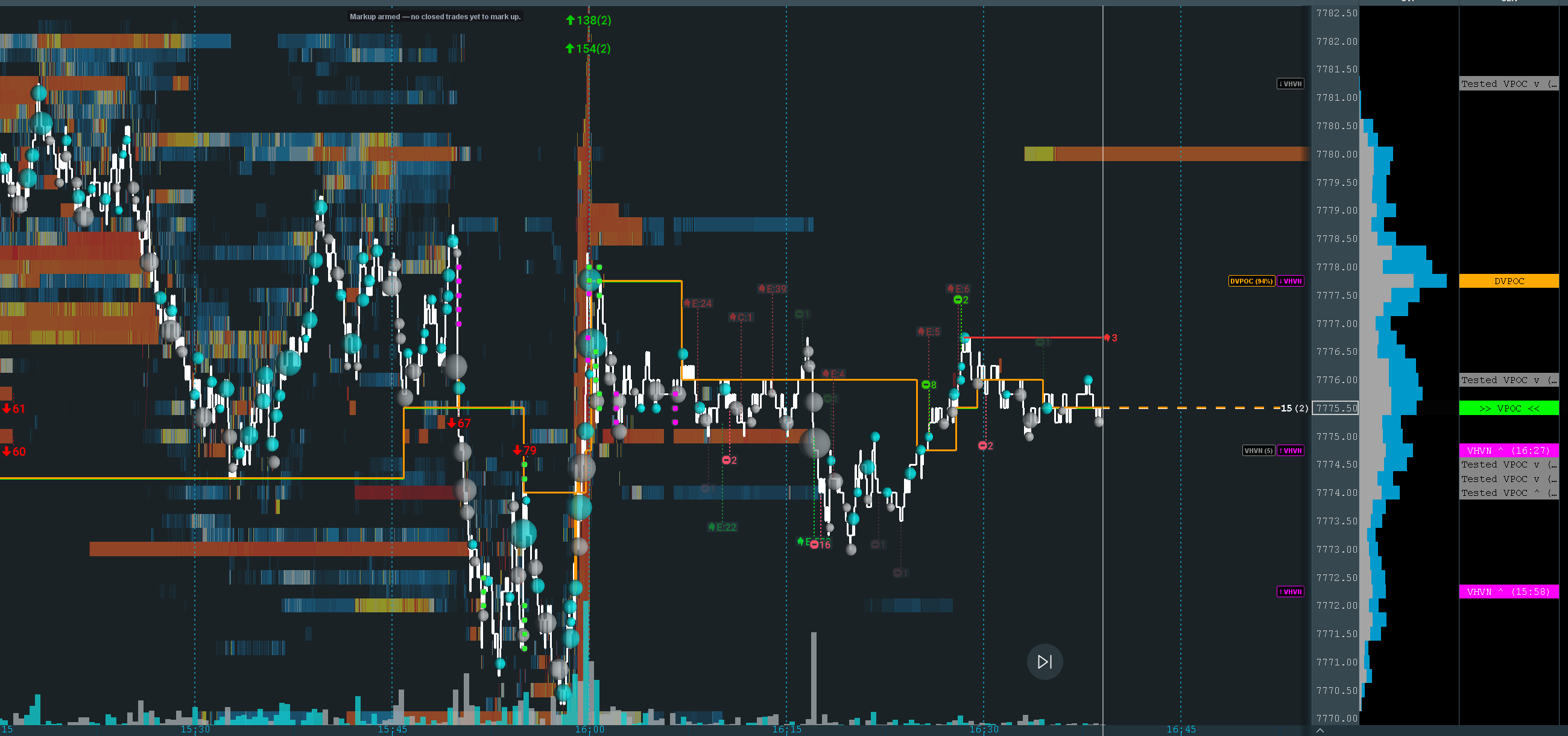
VPOC Migration Pro is a paid Bookmap addon that monitors the Volume Point of Control in real time, identifies the Developing VPOC before it shifts, and classifies every prior VPOC as Naked or Tested. Levels stream directly to Bookmap's Cloud Notes panel.

VPOCCurrent
fair value
DVPOCDeveloping
VPOC
TESTEDPrior VPOC
price revisited
NAKEDPrior VPOC
untouched
📊 See real VPOC migration stats from recent sessions →
Live on Bookmap Store Bookmap v7.6.0+ Tick-by-tick · ~50 ms updates

Four levels. Built around real auction context.

The Volume Point of Control is the price level where the most volume has traded — Auction Market Theory's declared fair value. VPOC Migration Pro tracks it tick by tick and gives you the structural levels around it that traders actually use.

Current

VPOC

The single price where the most volume has traded this session. The market's current declared fair value. Recalculated on every incoming trade so it matches Bookmap's native volume profile in real time.

Developing

DVPOC

The highest-volume level at least N points outside the current VPOC's area (configurable, default 5). Where fair value is being contested — and where a VPOC shift is most likely to land.

DVPOC here means Developing VPOC — the live intraday challenger. Not to be confused with the Daily VPOC (some traders use the same abbreviation for the prior day's settled VPOC). What's the difference? →

Untested

Naked VPOC

Every prior VPOC the market hasn't returned to. In AMT, untested fair-value levels represent unfinished business — high-probability magnets, especially in slow or rotational sessions.

Revisited

Tested VPOC

A prior VPOC that price has traded back to. The fair-value declaration has been acknowledged. Still potential support/resistance, but without the magnetic pull of an untested level.

📊 See real VPOC data & deep-dive guides

Background reading on every level type above, plus aggregated stats from real Bookmap sessions — pulled directly from VPOC Migration Pro's own session logs. RTH only.

Live Data

Real Session Stats

Live numbers from real Bookmap sessions: 2,001+ VPOC shifts tracked, naked-touch rates, time-to-touch distributions, DVPOC confirmation rate, and time-of-day activity.

→ View all VPOC data
ES — May 2026 stats
ES — April 2026 stats

Concepts

VPOC Guides

Plain-English explainers on every concept the addon tracks — VPOC, Naked vs Tested levels, Developing VPOC, migration mechanics, and Auction Market Theory.

→ What is VPOC?
Naked vs Tested VPOC
Developing VPOC
VPOC migration explained
Auction Market Theory

Setup Help

Bookmap Cloud Notes

Step-by-step setup guides for wiring VPOC Migration Pro's HTTP server output into Bookmap's Cloud Notes panel so the levels render on your chart.

→ Cloud Notes setup guide
Tracking VPOC in Bookmap
Opening drive VPOC

Built for AMT traders who watch volume.

Every setting that matters, exposed. Voice alerts that speak fast, sequentially, and only when you want them. A session log you can actually use for journaling.

Tick-by-tick VPOC

VPOC recalculates on every incoming trade — no polling, no batching. Matches Bookmap's native Session Volume Profile in real time. Update interval configurable from 50 ms to 2000 ms.

🎯

Migration Direction Arrows

Each level shows ^ (up) or v (down) so you can read the migration trail at a glance — where fair value has been pulled to over the session.

Dwell Time Filter

VPOC must hold at a new level for X seconds before it's officially recognized. Eliminates flicker noise during volatile open ranges where two adjacent levels battle for volume. Default 30s, optional.

📐

DVPOC Min Distance

The Developing VPOC must be at least N points outside the current VPOC's area to qualify. Without this it would always be the adjacent tick — meaningless. Default 5 points (tuned for ES); fully configurable.

🔊

Voice + Sound Alerts

Three independent alert types — VPOC Shift, Naked Touch, DVPOC Changed — each with its own sound and voice toggle. Fires only when you want it, with cooldowns to prevent stacking.

🗣

Pronunciation Map

Customize how Windows TTS reads labels without changing what's on the chart. DVPOC=D V-Pock instead of "D-V-P-O-C." Voice selection across all installed Windows voices, speech rate -10 to +10.

🎚

Speech Queue

Voice alerts queue and play sequentially — never overlap, never garbled, even when multiple events fire at the open. Combined with cooldowns and Mute-at-Open, your audio stays usable.

🌅

Mute at Open

Suppress all alerts for the first X minutes after session start. Default 5 minutes — long enough for the open's volatility to settle, short enough to catch the early VPOC shifts that matter.

🎯

Naked Proximity Alert

Optional alert that fires when price comes within X ticks of a Naked VPOC level. Catch the magnet pull before it actually tags. Off by default; tune to your noise tolerance.

📅

Session Presets

Globex (18:00 ET start) for the full overnight session, RTH (09:30 ET) for regular trading hours only, or Custom in quarter-hour increments. Auto-reset clears levels and restarts the profile at the boundary.

🌐

Built-in HTTP Server

Levels stream directly to Bookmap Cloud Notes via local HTTP — no external scripts, no middleware, no third-party dependencies. Default 127.0.0.1:8001/vpoc_levels.csv.

🎨

Per-Level Appearance

Show/hide, label text, foreground color, background color, and horizontal price line — independently per level type. VPOC always renders last so it's never obscured. Show DVPOC % appends the developing node's volume vs VPOC.

📝

Session Log

Auto-dated migration history written for every session — timestamp, target level, direction, end-of-day summary stats. Default path: C:\BookMap Indicators\vpoc_session_log\. Built for end-of-day journaling.

📊

Max Levels Shown

Optional cap on total displayed levels. When enabled, the oldest Tested/Naked levels are hidden first so the chart stays readable during long, level-heavy sessions. Default 20.

📥

Historical Backfill

On addon load, the prior session bars are replayed to build accurate VPOC and migration history — even if you connected to Bookmap mid-session. The current session's level state is correct from the moment the addon attaches.

💾

Settings Persist

Every setting — labels, colors, ports, voice config, pronunciation map, session preset — persists across Bookmap restarts. Configure once, never touch it again unless you want to.

From subscribe to chart in five minutes.

Subscription, billing, and installation are all handled inside Bookmap via the Marketplace and Add-ons Manager. No manual JAR downloads, no plugin folder fiddling.

Subscribe on the Marketplace

Visit the VPOC Migration Pro listing on the Bookmap Marketplace, log in with your Bookmap credentials, and complete the subscription. Bookmap handles billing and license enforcement.

Open the Add-ons Manager

In Bookmap: Settings → Add-ons Manager. Bookmap detects the addon automatically against your license — no manual download needed.

Click Install

Hit the Install button next to VPOC Migration Pro in the Add-ons Manager. Bookmap downloads and installs the addon for you. Restart Bookmap if prompted.

Activate & Connect

Open a chart, click Strategies, toggle VPOC Migration Pro on. Then enable a Cloud Notes column on your chart, right-click it, and paste the URL from the addon's settings panel (default http://127.0.0.1:8001/vpoc_levels.csv — port and address are configurable). Levels appear on the next Cloud Notes poll (~60 sec). Full setup guide →

✓ APPROVED · LIVE NOW ON THE BOOKMAP MARKETPLACE

Subscribe through Bookmap, billed through Bookmap.

$25/ month
PAID VIA BOOKMAP STORE · LICENSE ENFORCED BY BOOKMAP

Subscription, billing, and license enforcement are handled by Bookmap's infrastructure — SDES never sees your payment details. Cancel anytime through your Bookmap account.

⚡ View on Bookmap Marketplace

Common questions

What's required to run it?

Bookmap v7.6.0 or later, an active Bookmap data feed (any provider — Rithmic, CQG, dxFeed, IB, TM.Lite, etc.), and a paid VPOC Migration Pro subscription via the Bookmap Store. Voice alerts use Windows TTS (PowerShell-based) and are Windows-only; everything else is cross-platform.

How does the license work?

License enforcement is handled entirely by Bookmap's infrastructure. The addon won't run without a valid, active subscription tied to your Bookmap account. SDES has no access to your payment details — billing and license state live with Bookmap.

How is the addon installed?

Subscribe on the Bookmap Marketplace, then open Settings → Add-ons Manager in Bookmap and click Install. Bookmap handles the rest.

What's the difference between VPOC Migration Pro and the free HVN/LVN Marker addons?

The free HVN Marker and LVN Marker detect node clusters — local highs and lows on the volume profile. VPOC Migration Pro tracks the single highest-volume level tick by tick, classifies prior VPOCs as Naked or Tested, and identifies the Developing VPOC. Different question, different answer. They run side-by-side without conflicts (different ports — VPOC: 8001, HVN: 8002, LVN: 8003).

Why does the VPOC sometimes differ from Bookmap's native Session Volume Profile?

For best accuracy, keep Bookmap running continuously through the session. If Bookmap restarts or the data feed disconnects mid-session, the addon's backfilled trades may differ slightly from live-accumulated data, causing minor discrepancies. With a clean session start and no interruptions, the VPOC matches the native SVP exactly.

Can I run this alongside other SDES addons?

Yes. VPOC Migration Pro defaults to port 8001, HVN Marker to 8002, LVN Marker to 8003. Add each as a separate Cloud Notes source in Bookmap to see all of them on the same chart at once.

How do I cancel or get a refund?

Cancellation and refund policy are handled by Bookmap, not SDES. Manage your subscription through your Bookmap account or the Bookmap Store. SDES doesn't have the ability to issue refunds for marketplace purchases.

What support is included?

Email questions and bug reports — free. Drop a note to [email protected]. Replies aren't instant — expect a day or two — but every email gets a real answer. The full User Manual (PDF) covers every setting in detail; read it first.

Live screen-share, setup walk-throughs, hands-on configuration help — paid. Book a 1-on-1 session at $150/hr (evenings and weekends US Eastern Time) when you want me on a call with you instead of trading emails.

Is the source code available?

No. VPOC Migration Pro is proprietary, distributed as a compiled .jar through the Bookmap Marketplace. Reverse engineering, redistribution, and modification are prohibited under the marketplace license.